
Swarm 1: Your first swarm
Launch Quay's Dev & Watcher swarm: a Claude Code agent beside a PowerShell pane that runs your tests on every save. The agent builds a tip calculator while you watch its tests go green.
- Time about 10 min
- Tokens about 250k
- Agents 1 × Claude + 1 × PowerShell
- Level Starter
You'll learn: how to launch a swarm from the Swarm Launcher (Ctrl+B S), work in a side-by-side split, move focus between panes (Ctrl+B O) and zoom a pane to the whole stage (Ctrl+B Z).
Quay's window has two parts: the rail, the panel down the left that lists your projects and their terminals, and the stage to its right, where the terminal panes open. When the stage is split, each pane has a header along its top with the terminal's name and, for an agent, its status. Every Ctrl+B shortcut is two key presses: press Ctrl+B, let go, then press the next key within a second and a half.
Before you start
1. Get the starter project
Do
- Download
first-swarm.zipand unzip it into a new, empty folder. - In Quay, click Add at the top of the rail, click Browse..., pick that folder and click Add Project.
- Press
Ctrl+B N, choose PowerShell Console and click Start Terminal (Enter).
Paste into PowerShell pane
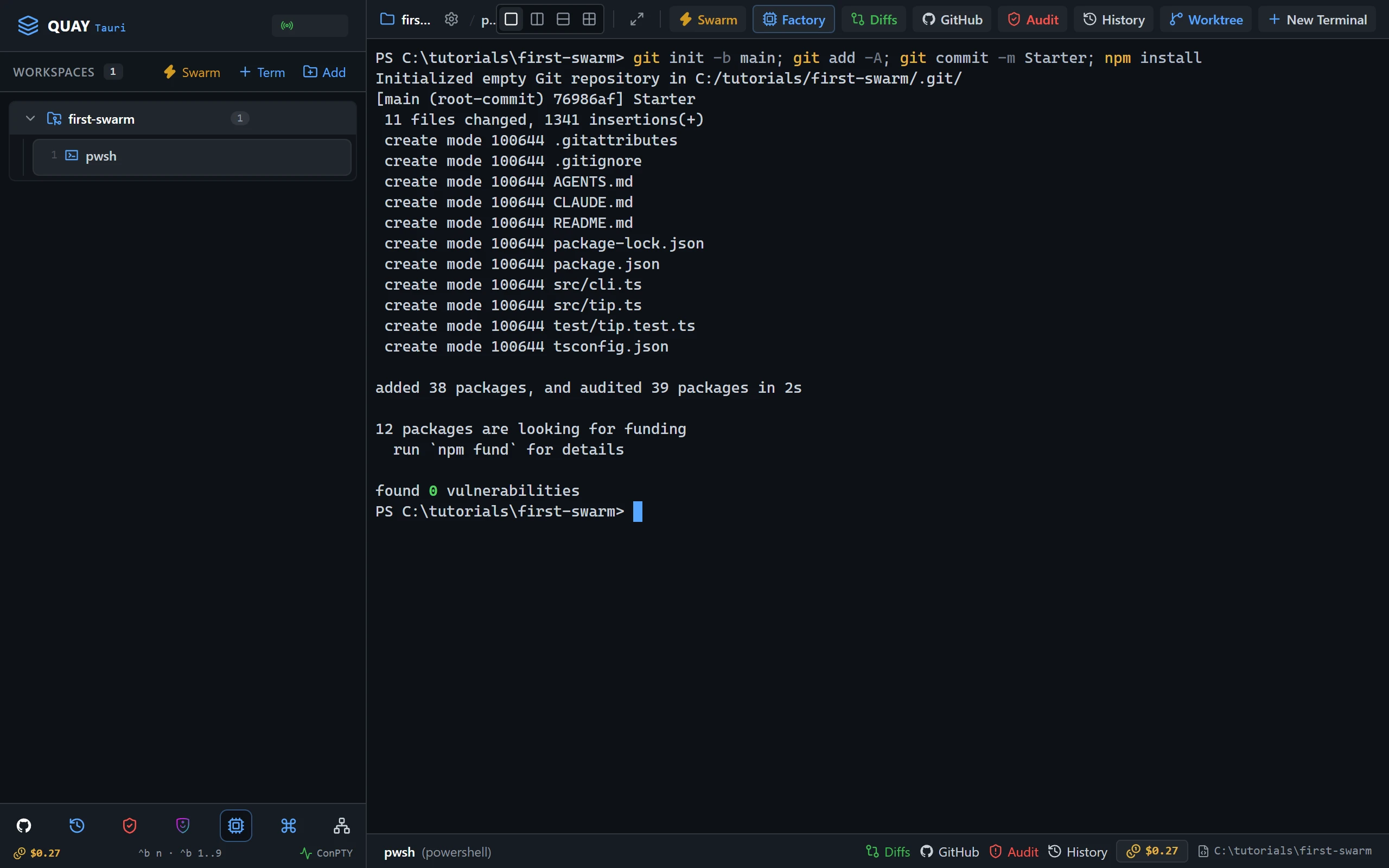
git init -b main; git add -A; git commit -m Starter; npm installYou should see
Must match
git commitprintsStarteras the message.npm installends withfound 0 vulnerabilities.
May differ
- The commit id, and the package counts and timings
npm installprints.
If not: node or npm is not recognised
Node.js 24 or later isn't on your PATH. Install it as Node.js and npm shows, close and reopen Quay so its terminals see it, then paste the line again.
If not: git commit says Author identity unknown
Git doesn't know your name and email yet. Set them as Git shows, then paste the line again.
2. Launch the swarm
Do
- Press
Ctrl+B S. The Swarm Launcher opens with Dev & Watcher already selected. - Click Launch Swarm Now.
You should see
Must match
- Two panes side by side:
lead-devon the left andbuild-watcheron the right. - The rail lists
lead-devandbuild-watcherunder the project, beside the PowerShell pane from step 1. lead-dev's first line readsRole: Lead Developer, and it waits for your task.
May differ
- The wording of
lead-dev's one-line reply. - The port number in the rail header.
If not: lead-dev asks you to accept Bypass Permissions mode
Quay starts a swarm's Claude Code agents in Skip mode, which Claude Code calls Bypass Permissions mode, and Claude Code asks once before its first session in that mode. Click into lead-dev, choose Yes, I accept and press Enter. It then confirms its role.
If not: lead-dev shows the plugin hint
Quay isn't hearing from the event-bridge plugin. Install it as the hint says, then run /reload-plugins in lead-dev. The hint goes away as soon as Quay hears from the plugin.
3. Start the watcher
Do
- Press
Ctrl+B Oto move focus tobuild-watcher. Its border lights up.
Paste into build-watcher
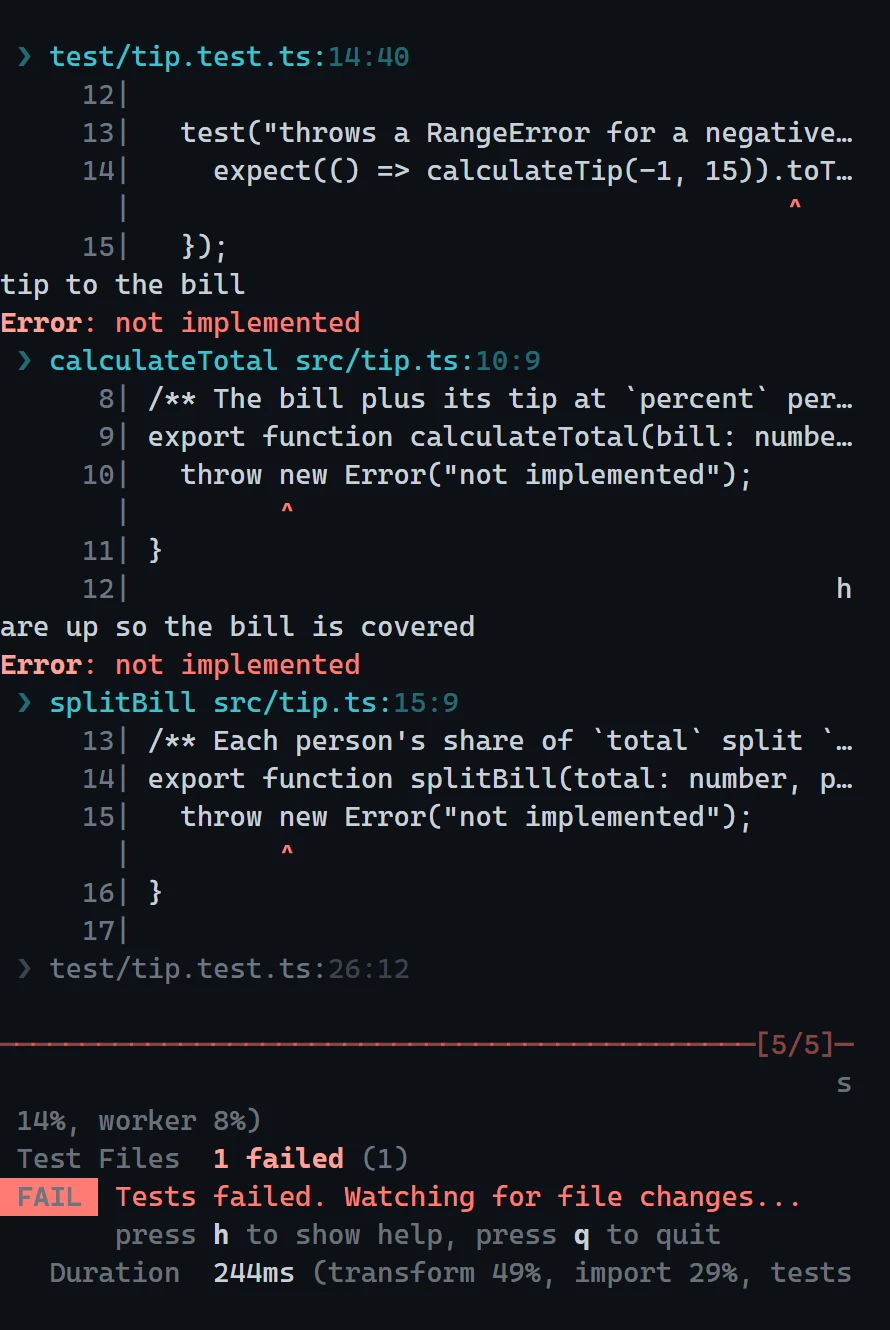
npm testYou should see
Must match
Tests 5 failed (5).- A
Waiting for file changes...line under it.
May differ
- How long the run takes, and the times beside each test.
If not: vitest is not recognized
npm install didn't finish in step 1. Paste npm install into build-watcher, wait for it to finish, then paste npm test again.
4. Give lead-dev the job
Do
- Press
Ctrl+B Oto move focus back tolead-dev.
Paste into lead-dev
Implement src/tip.ts so every test in test/tip.test.ts passes. Don't run the tests yourself: the build-watcher pane is running them, and I'm watching it. Tell me when you believe they all pass.You should see
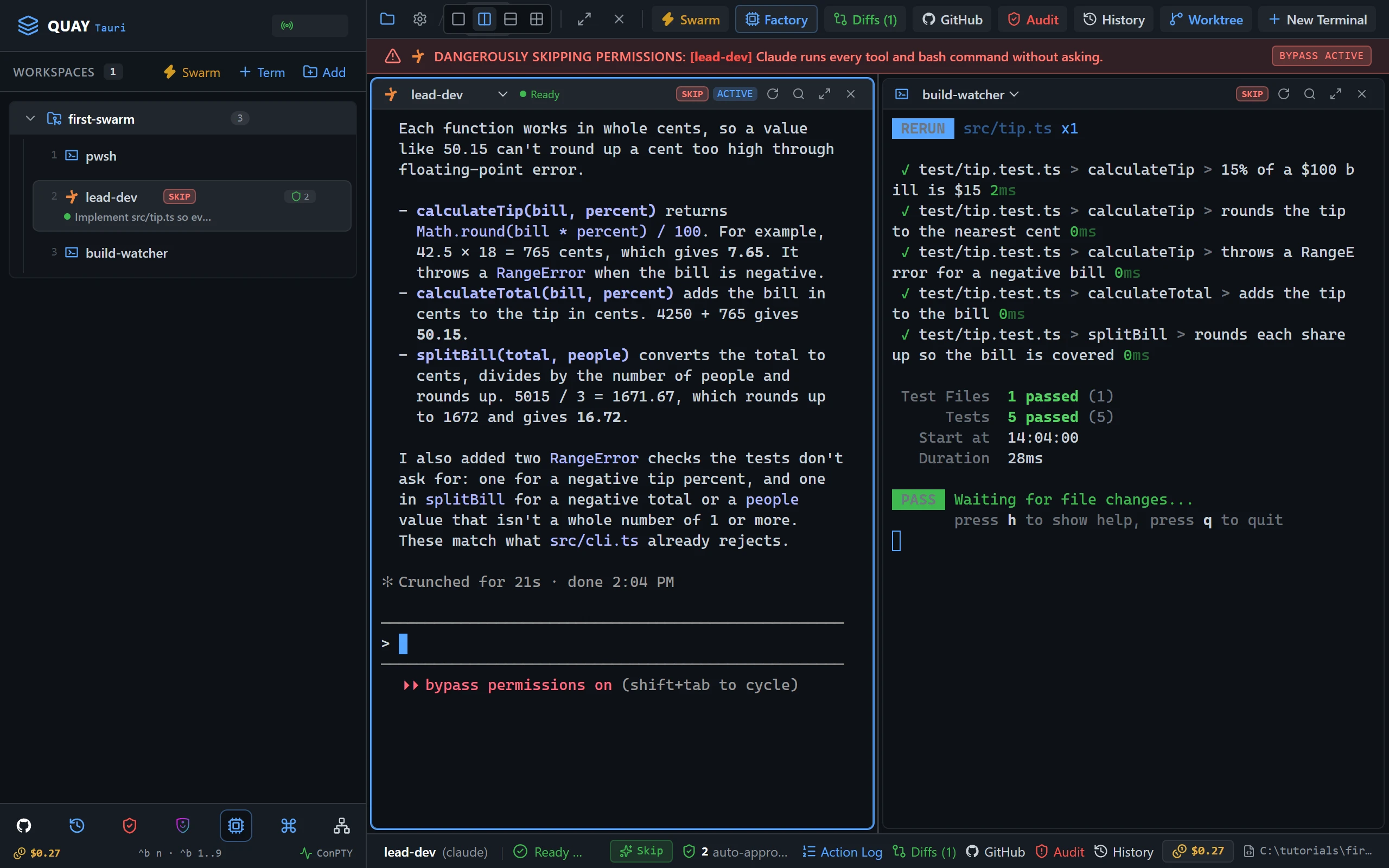
Must match
build-watchershowsTests 5 passed (5).- At the end,
lead-dev's pane header shows a green dot andReady. lead-devtells you it believes the tests pass.
May differ
- The tools
lead-dev's pane header names while it works, beside a spinner. - How many times the watcher re-runs on the way.
lead-dev's wording, and how long it takes.
If not: lead-dev runs the tests itself anyway
It still works; the lesson is just quieter. When it finishes, paste Thanks. From now on leave test runs to the watcher. into lead-dev.
If not: the watcher never re-runs
Vitest re-runs when a file under the project changes. Check that lead-dev edited src/tip.ts and didn't write a new file somewhere else.
5. Zoom in on the result
Do
- Press
Ctrl+B Oto move focus tobuild-watcher. - Press
Ctrl+B Zto zoom it to the whole stage, and read the five passing tests. - Press
Ctrl+B Zagain to put the split back.
You should see
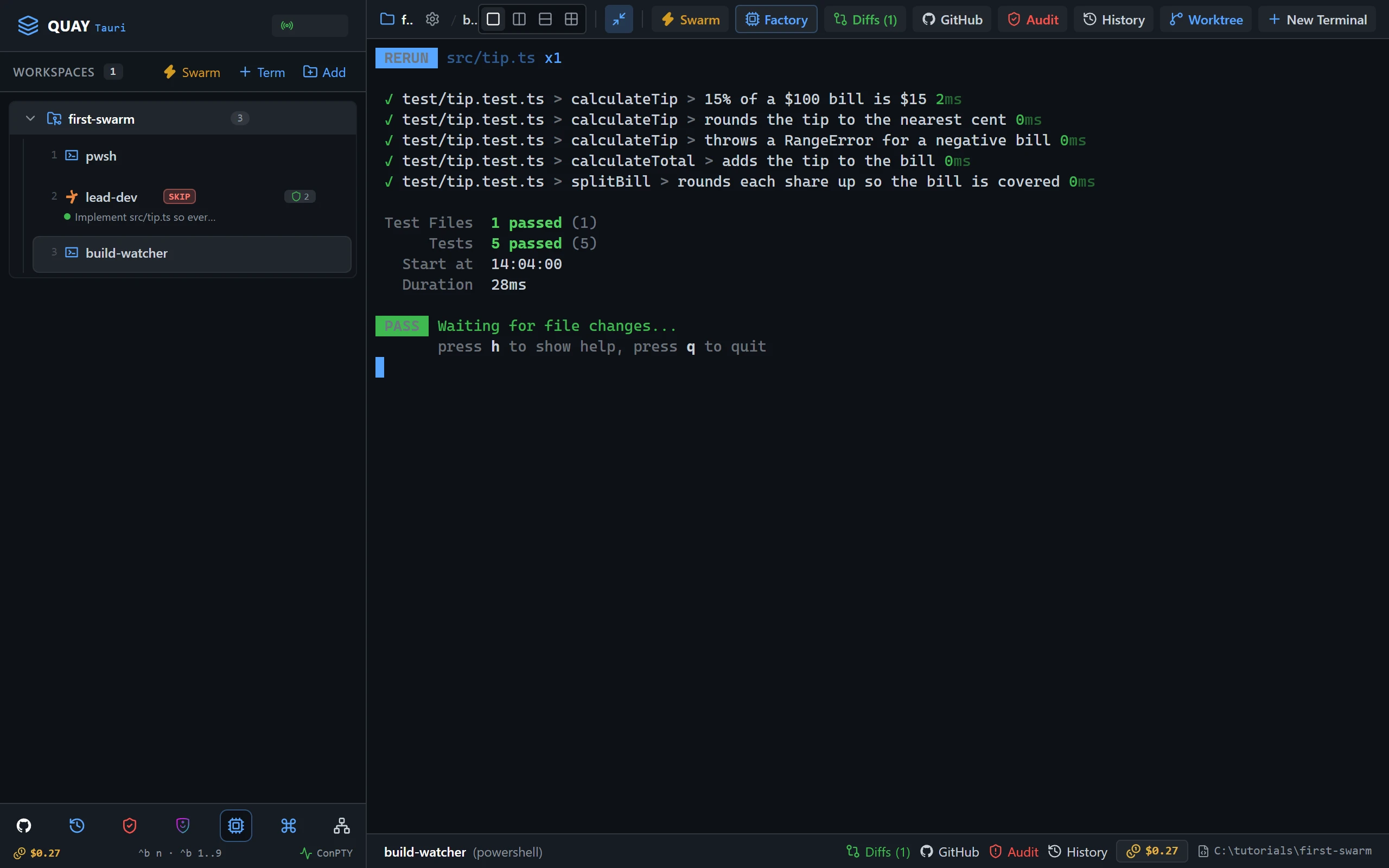
Must match
build-watcherfills the stage.- Five test names, each with a green ✓.
May differ
- The times beside each test.
If not: Ctrl+B Z did nothing
The Ctrl+B prefix lasts a second and a half. Press Ctrl+B, let go, then press Z straight after.
If not: Ctrl+B Z zoomed lead-dev instead
Focus was still on lead-dev. Press Ctrl+B Z to put the split back, then Ctrl+B O to move focus to build-watcher, and zoom again.
6. Check it worked
Do
- With focus still on
build-watcher, pressqto stop the watcher.
Paste into build-watcher
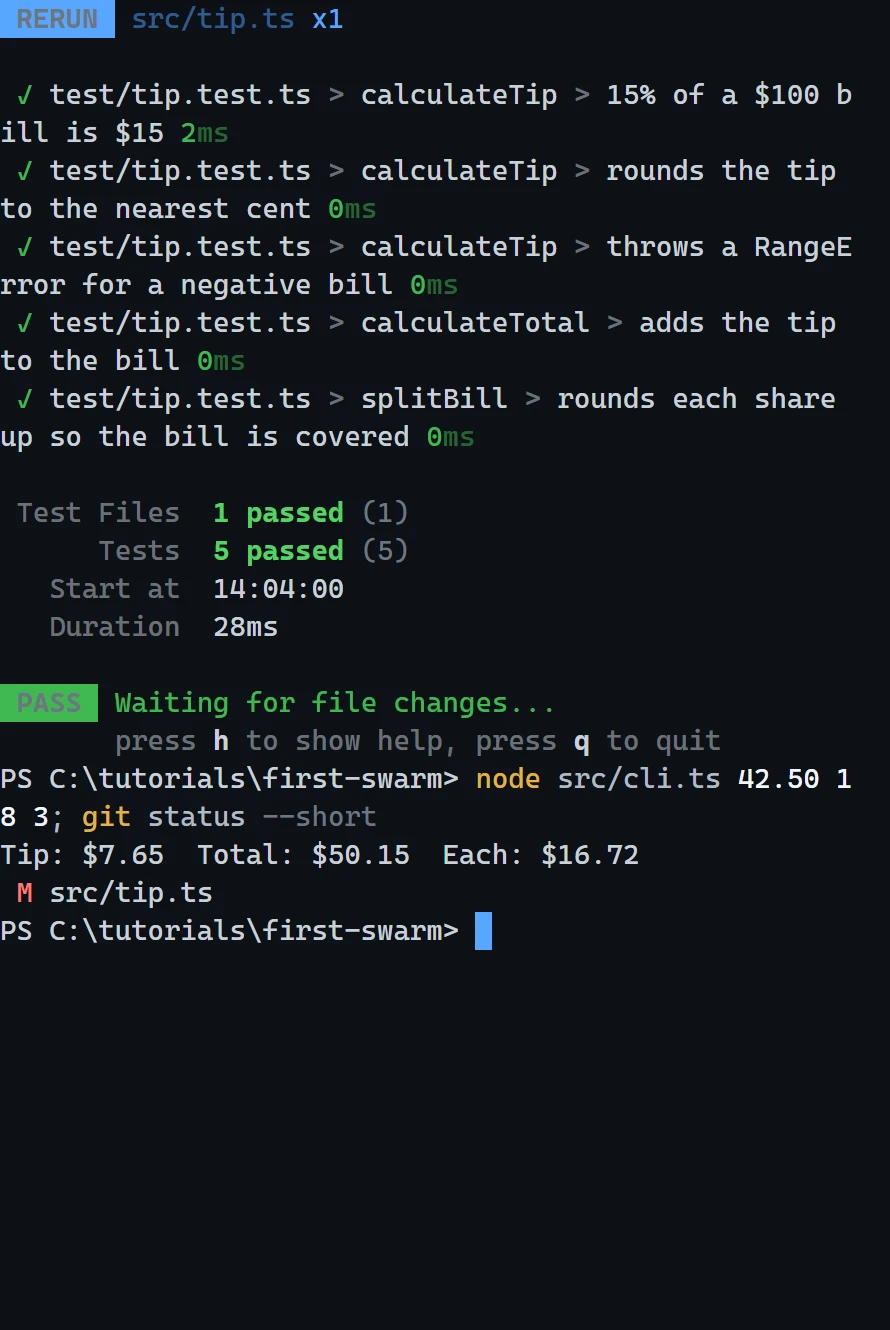
node src/cli.ts 42.50 18 3; git status --shortYou should see
Must match
- The CLI prints
Tip: $7.65 Total: $50.15 Each: $16.72. git status --shortprints one line,M src/tip.ts.
May differ
- The folder in the PowerShell prompt, which is wherever you unzipped the starter.
You’re done when
- ✅
build-watchershowedTests 5 passed (5). - ✅ The CLI prints
Tip: $7.65 Total: $50.15 Each: $16.72. - ✅
git status --shortlistssrc/tip.tsas the only modified file.