
Swarm 2: TDD Swarm kata
Build a password-strength checker the test-first way with Quay's TDD Swarm: one Claude Code agent writes the tests, a second makes them pass, a PowerShell pane re-runs them on every save, and a third agent reviews the result. You drive the loop yourself, one pane at a time.
- Time not measured yet
- Tokens not measured yet
- Agents 3 × Claude + 1 × PowerShell
- Level Starter
You'll learn: how to launch a four-pane preset in a 2x2 grid, move between its panes, zoom one pane to read it (Ctrl+B Z), and run a red, green, review loop by hand. A2A 3 automates this same loop.
Quay's window has two parts: the rail, the panel down the left that lists your projects and their terminals, and the stage to its right, where the terminal panes open. When the stage is split, each pane has a header along its top with the terminal's name and, for an agent, its status. Every Ctrl+B shortcut is two key presses: press Ctrl+B, let go, then press the next key within a second and a half. Each prompt the page gives you goes into the pane it names: click inside that pane, paste the prompt, and press Enter to run it or, in a Claude Code pane, to send it.
Before you start
1. Get the starter project
Do
- Download
tdd-swarm-kata.zipand unzip it into a new, empty folder. - In Quay, click Add at the top of the rail, click Browse..., pick that folder and click Add Project.
- Press
Ctrl+B N, choose PowerShell Console and click Start Terminal (Enter).
Paste into PowerShell pane
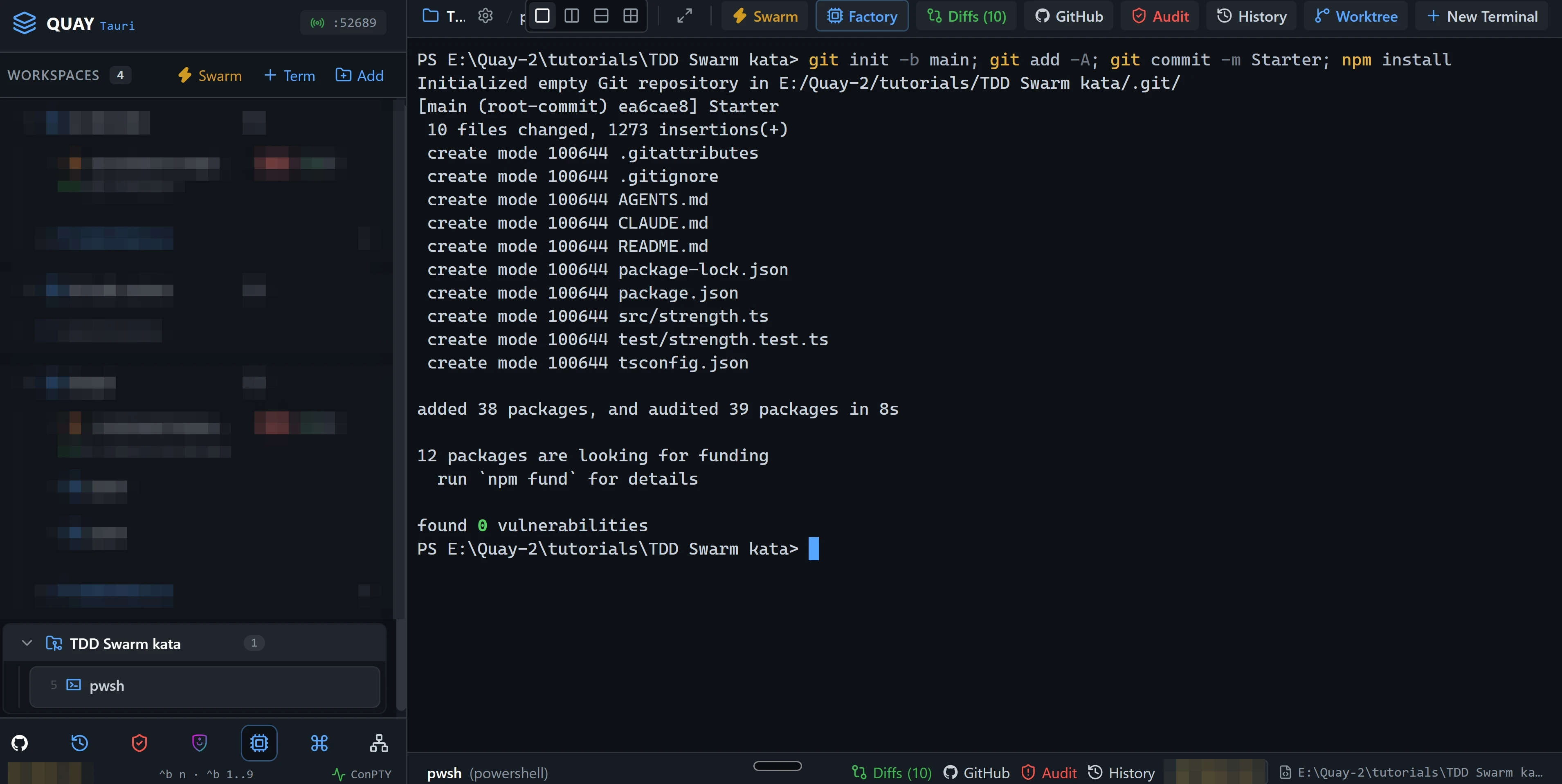
git init -b main; git add -A; git commit -m Starter; npm installYou should see
Must match
git commitprintsStarteras the message.npm installends withfound 0 vulnerabilities.
May differ
- The commit id, and the package counts and timings
npm installprints.
If not: node or npm is not recognised
Node.js 24 or later isn't on your PATH. Install it as Node.js and npm shows, close and reopen Quay so its terminals see it, then paste the line again.
If not: git commit says Author identity unknown
Git doesn't know your name and email yet. Set them as Git shows, then paste the line again.
2. Launch the TDD Swarm
Do
- Press
Ctrl+B S. The Swarm Launcher opens with Dev & Watcher selected. - Click the TDD Swarm card.
- Click Launch Swarm Now.
- Wait until each of the three Claude Code panes has confirmed its role in one line.
You should see
Must match
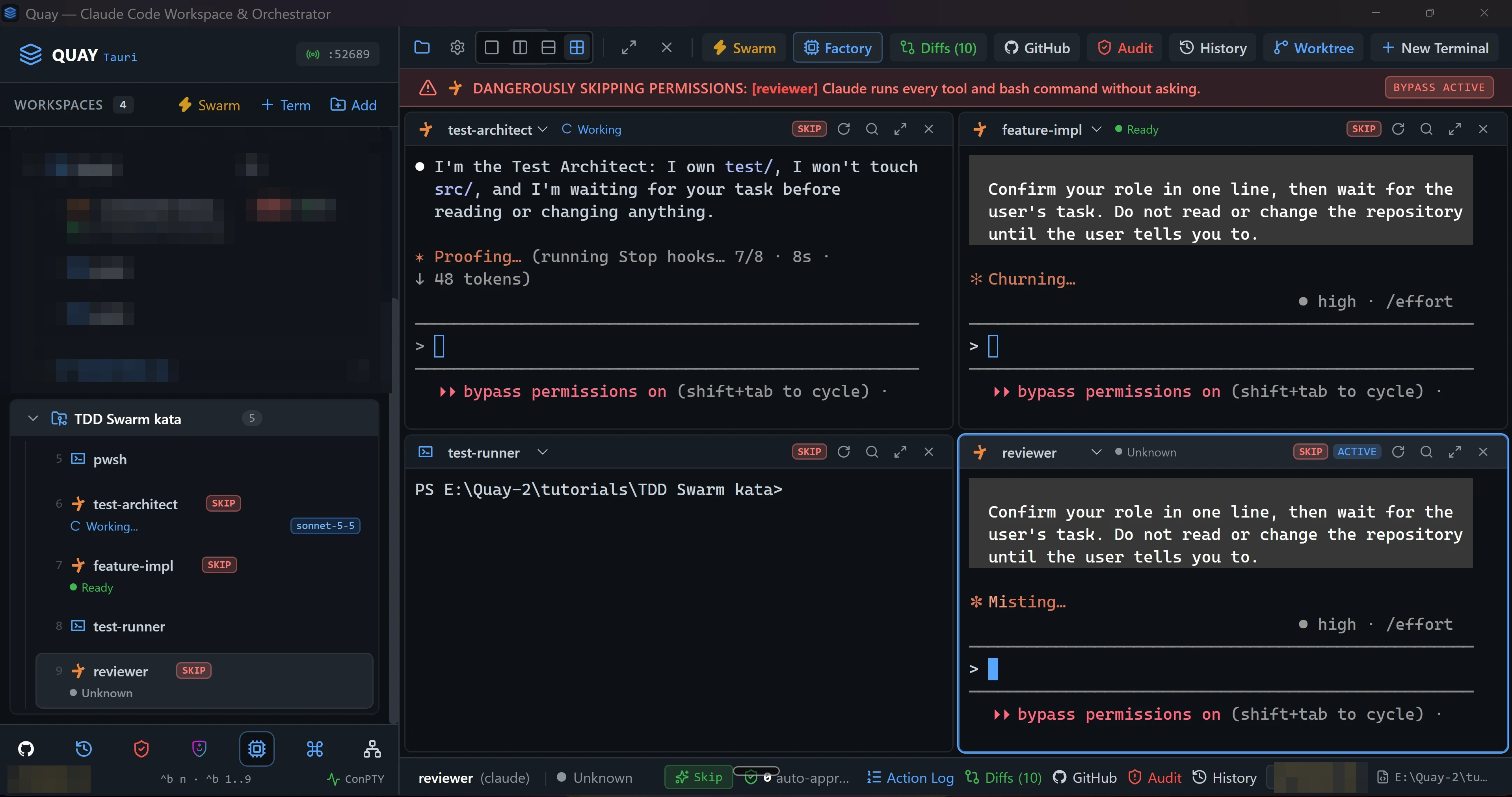
- Four panes in a 2x2 grid:
test-architecttop left,feature-impltop right,test-runnerbottom left andreviewerbottom right. - The rail lists all four under the project, beside the PowerShell pane from step 1.
test-architect,feature-implandreviewereach confirm their role in one line, then wait for your task.test-runnersits at a PowerShell prompt.- While a Claude Code pane has focus, a red DANGEROUSLY SKIPPING PERMISSIONS banner runs across the top of the stage and names that pane. That is expected: swarm agents run in Skip mode.
May differ
- The wording of each one-line confirmation, and how long each pane takes to start.
- The port number in the rail header.
- Which pane the red banner names, and whether it shows at all while
test-runnerhas focus.
If not: a Claude Code pane asks you to accept Bypass Permissions mode
Quay starts a swarm's Claude Code agents in Skip mode, which Claude Code calls Bypass Permissions mode, and Claude Code asks once before its first session in that mode. Click into the pane that asks, choose Yes, I accept and press Enter. It then confirms its role. Do the same in any other pane that asks.
If not: a Claude Code pane shows the plugin hint
Quay isn't hearing from the event-bridge plugin. Install it as the hint says, then run /reload-plugins in that pane. The hint goes away as soon as Quay hears from the plugin.
If not: test-architect stops with an error about its model
Your Claude Code sign-in can't use claude-sonnet-5-5, the model the TDD Swarm preset starts test-architect on. Sign in to Claude Code with an account that can use it. Then close the four swarm terminals: in the rail, hover over each of test-architect, feature-impl, test-runner and reviewer and click the × that appears, Close terminal. Launch the swarm again from the start of this step.
3. Start the test watcher
Do
- Close the PowerShell pane from step 1, which you don't need again: in the rail, hover over
pwshunder the project and click the × that appears, Close terminal. - Click inside
test-runner, the bottom-left pane. Its border lights up.
Paste into test-runner
npm run test:watchYou should see
Must match
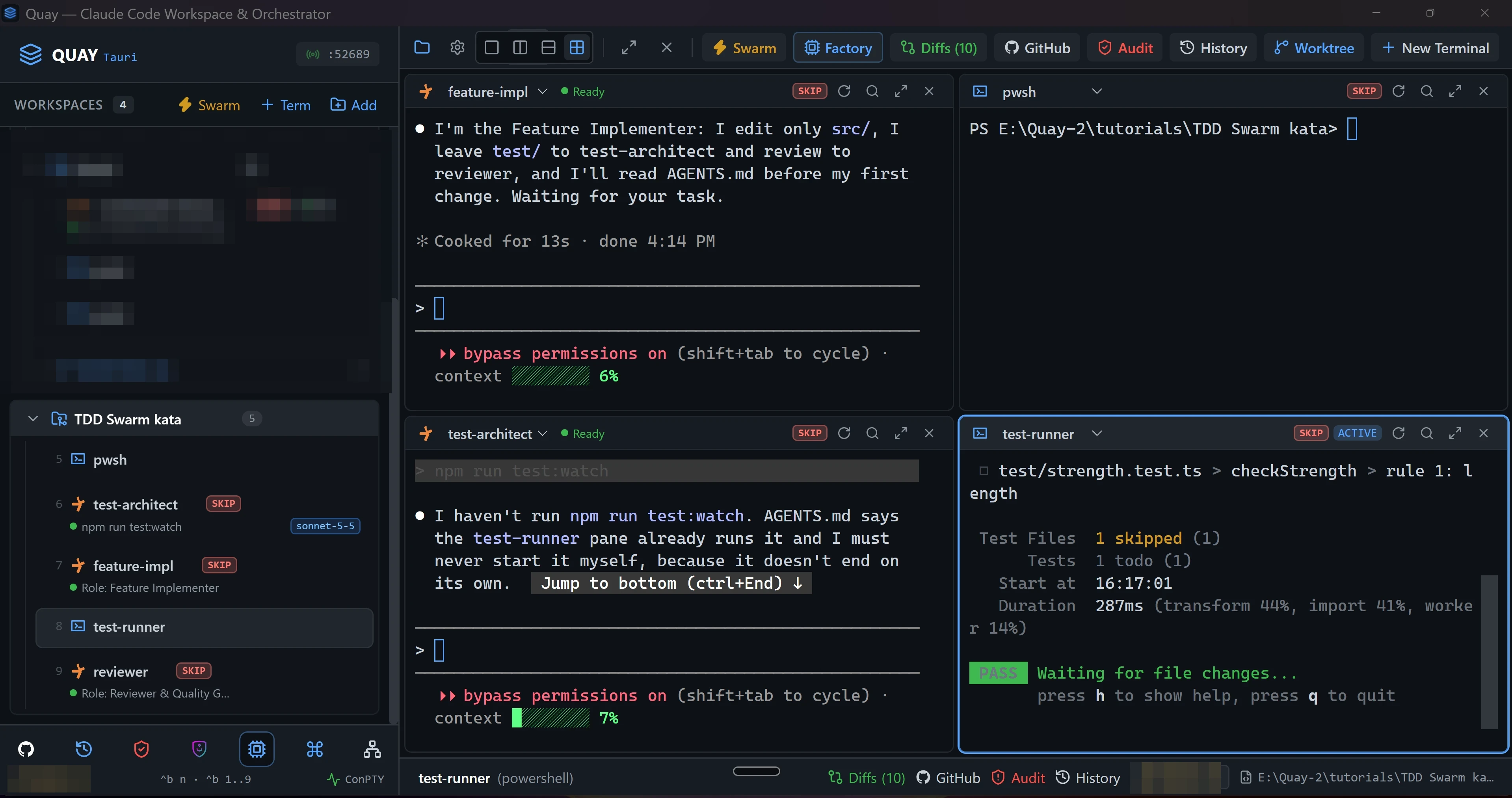
Tests 1 todo (1).- A
Waiting for file changes...line under it.
May differ
- How long the run takes.
If not: vitest is not recognized
npm install didn't finish in step 1. Paste npm install into test-runner, wait for it to finish, then paste npm run test:watch again.
If not: test-architect says it hasn't run npm run test:watch
You pasted the line into test-architect, which never starts the watcher itself. Find the pane whose header says test-runner, click inside it, and paste the line there.
4. Round 1, red: test-architect writes the first tests
Do
- Click inside
test-architect, the top-left pane.
Paste into test-architect
Read AGENTS.md. In test/strength.test.ts, replace the todo with failing Vitest tests for rule 1 (length) only: an 11-character password must fail it and a 12-character password must pass it, checking both score and failed. Pick passwords that pass rules 2 and 3, so these tests still hold once every rule is written. Do not touch src/.You should see
Must match
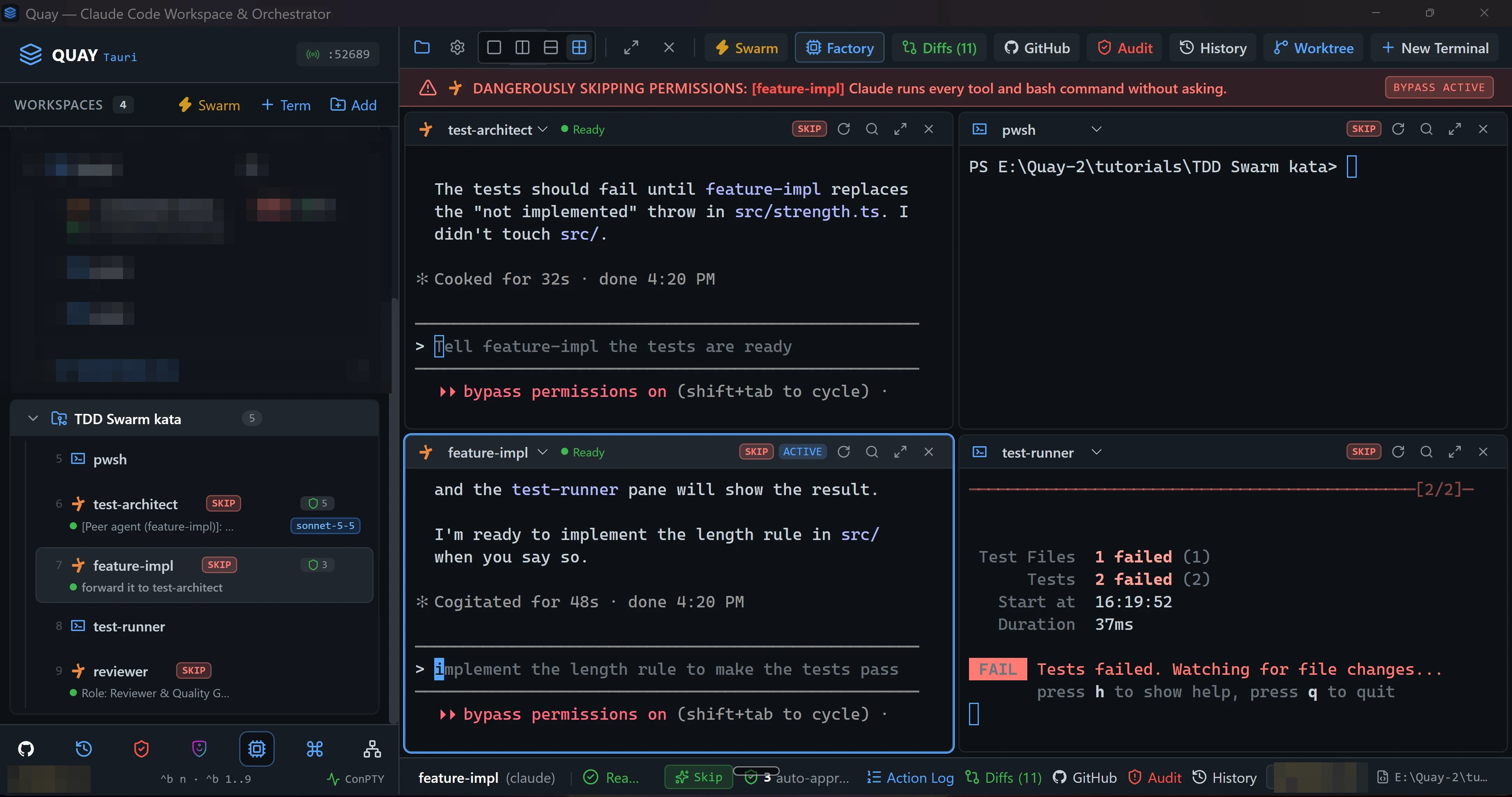
test-runnerre-ran on its own whentest-architectsaved the file.- Every test fails and none passes: the
Testsline shows only afailedcount. test-architectnamestest/strength.test.tsas the file it changed, and nothing undersrc/.
May differ
- How many tests
test-architectwrites, and their names. - The failure text, as long as every test fails.
test-architect's wording, and how long it takes.test-architectmay messagefeature-implon its own, andfeature-implmay answer that it's ready and waiting for you. Its rail line then starts with[Peer agent. Nothing changes insrc/until your prompt in step 5.- Grey text in a Claude Code pane's input box, such as
Tell feature-impl the tests are ready, is a suggestion Claude Code offers. Ignore it and paste the next prompt as usual.
If not: a test already passes
That test doesn't call checkStrength, which still throws. Paste Every test must fail until src/strength.ts is written. Fix the ones that pass. Do not touch src/. into test-architect.
If not: test-runner never re-runs
Vitest re-runs when a file under the project changes. Check that test-architect edited test/strength.test.ts and didn't write a new file somewhere else.
5. Round 1, green: feature-impl makes them pass
Do
- Click inside
feature-impl, the top-right pane.
Paste into feature-impl
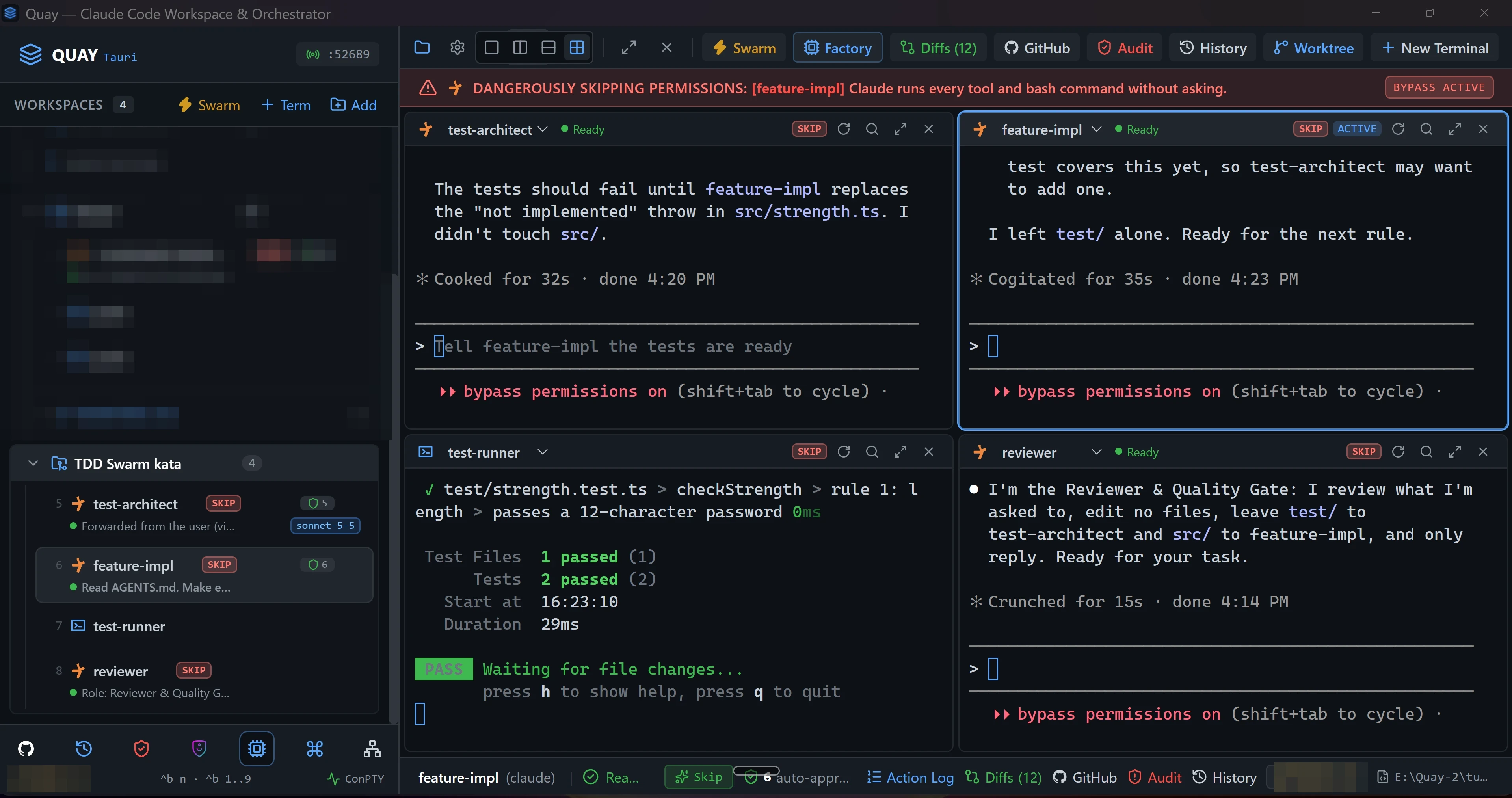
Read AGENTS.md. Make every test in test/ pass with the simplest correct implementation of checkStrength in src/strength.ts, covering rule 1 only for now. Do not edit test/.You should see
Must match
test-runnershows every test passing: theTestsline shows only apassedcount.feature-implnamessrc/strength.tsas the file it changed, and nothing undertest/.
May differ
- How
feature-implwrites the code, and its wording. - How many times
test-runnerre-runs on the way.
6. Review round 1
Do
- Click inside
reviewer, the bottom-right pane, and paste the prompt below. - When
reviewerhas replied, pressCtrl+B Zto zoom it to the whole stage, and read its findings. - Press
Ctrl+B Zagain to put the grid back.
Paste into reviewer
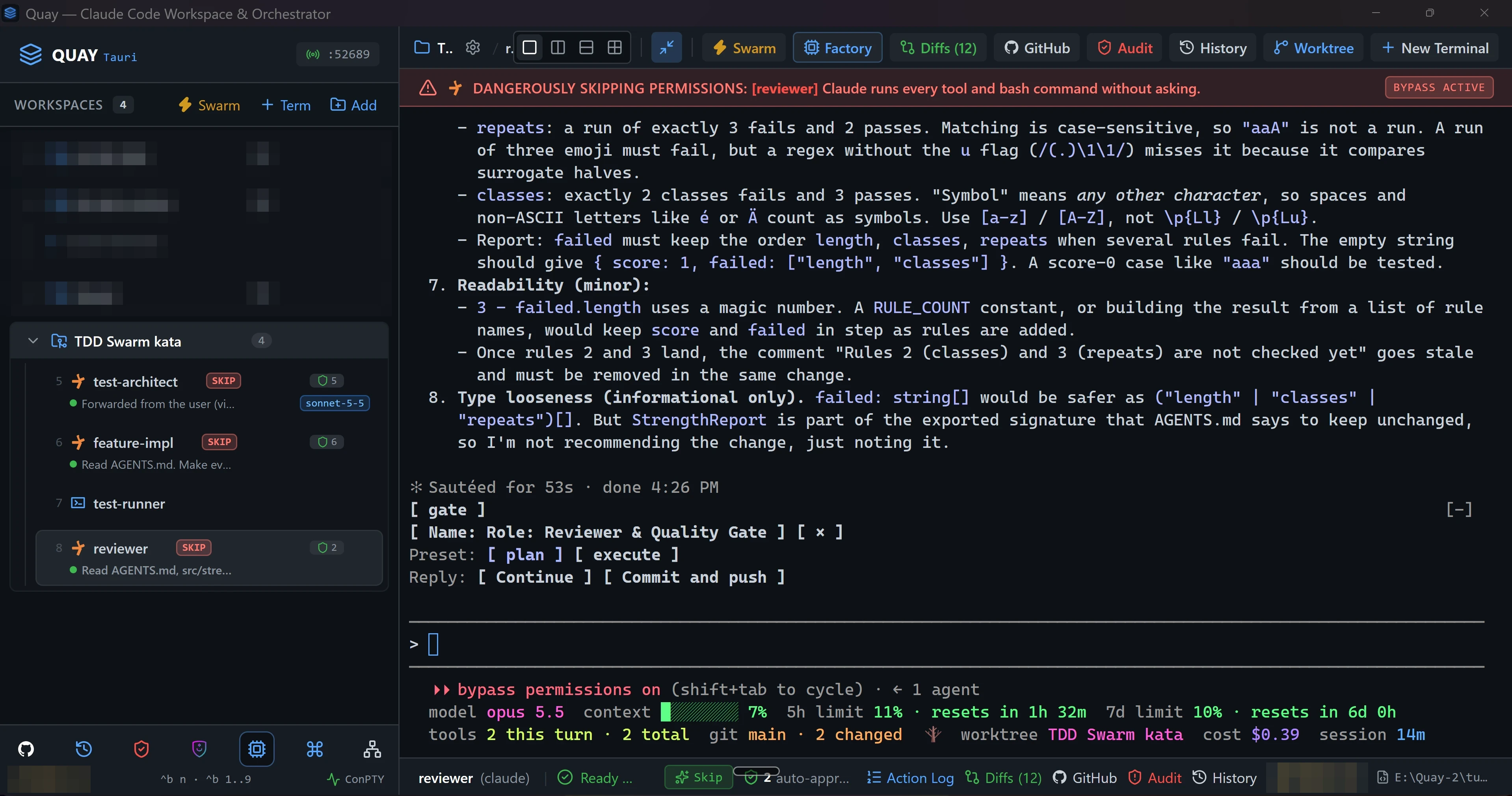
Read AGENTS.md, src/strength.ts and test/strength.test.ts. Review them for correctness, missed edge cases and readability. Reply with a numbered list of findings, most important first. Do not edit any file.You should see
Must match
reviewerfills the stage while zoomed.- Its reply is a numbered list.
- Back in the grid,
test-runnerhasn't re-run since step 5, becausereviewerchanged no file.
May differ
- The findings themselves, and how many there are.
- A row of bracketed choices Claude Code prints under the reply, such as
[ Continue ]. Leave them alone.
If not: Ctrl+B Z did nothing
The Ctrl+B prefix lasts a second and a half. Press Ctrl+B, let go, then press Z straight after.
If not: Ctrl+B Z zoomed another pane
Focus was on that pane, not reviewer. Press Ctrl+B Z to put the grid back, click inside reviewer, and zoom again.
7. Round 2, red: tests for the other two rules
Do
- Click inside
test-architect.
Paste into test-architect
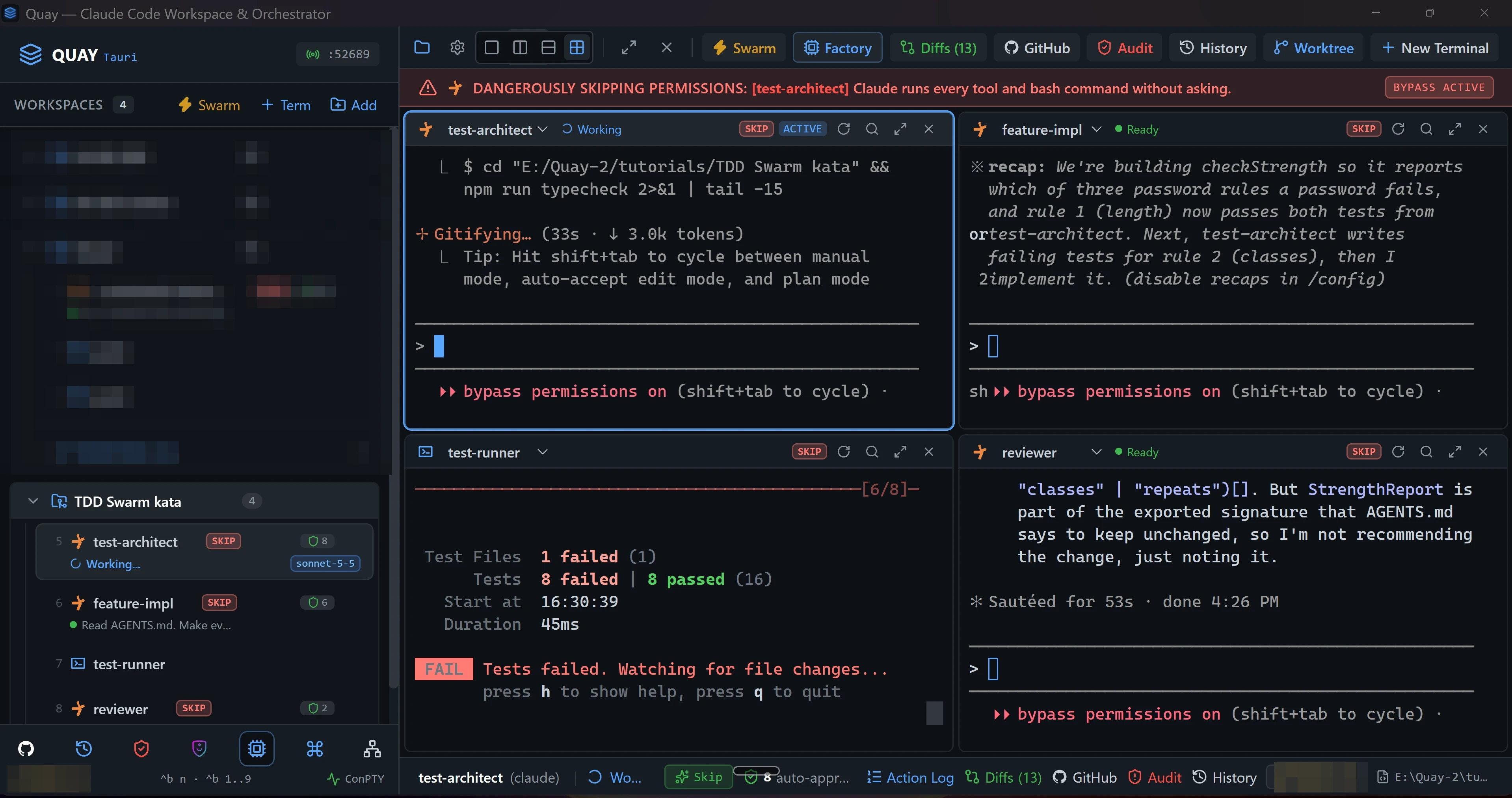
Read AGENTS.md again. Add failing tests for rule 2 (classes) and rule 3 (repeats), including the order of names in failed, and one test where a password passes all three rules. Keep the rule 1 tests as they are. Do not touch src/.You should see
Must match
- The
Testsline shows both afailedand apassedcount. test-architectnamestest/strength.test.tsas the file it changed, and nothing undersrc/.
May differ
- How many tests there are, and their names.
test-architect's wording, and how long it takes.
If not: every test passes
The new tests don't yet ask for anything src/strength.ts lacks. Paste Some of the new tests must fail until rules 2 and 3 are written. Fix the ones that pass. Do not touch src/. into test-architect.
8. Round 2, green: feature-impl writes every rule
Do
- Click inside
feature-impl.
Paste into feature-impl
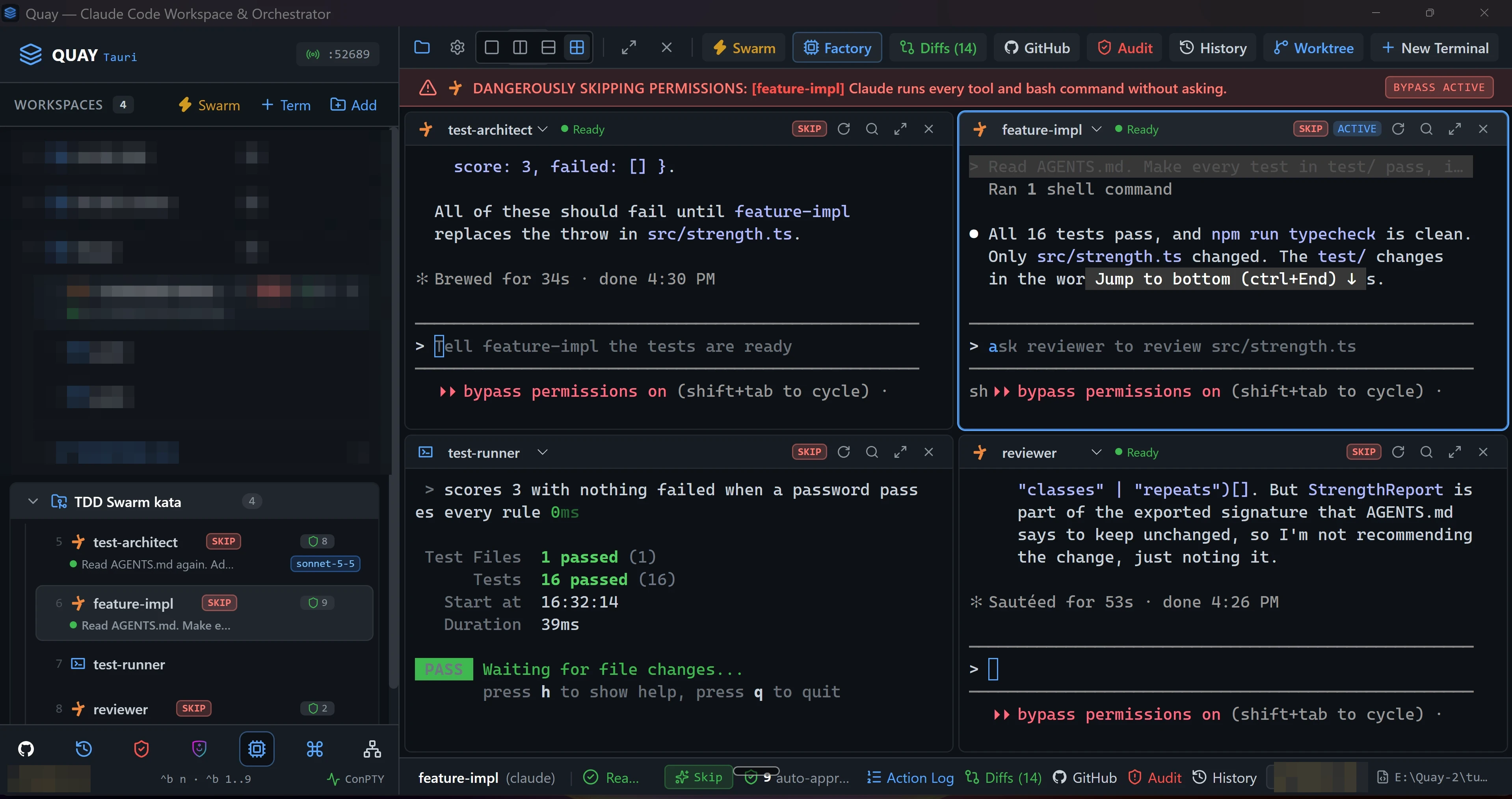
Read AGENTS.md. Make every test in test/ pass, implementing all three rules in src/strength.ts, then tidy the code without changing behaviour. Do not edit test/.You should see
Must match
test-runnershows every test passing: theTestsline shows only apassedcount, higher than in step 5.feature-implnamessrc/strength.tsas the file it changed, and nothing undertest/.
May differ
- How
feature-implwrites and tidies the code, and its wording. - The number of tests.
9. Sign-off
Do
- Click inside
reviewer.
Paste into reviewer
Re-read AGENTS.md, src/strength.ts and test/strength.test.ts. If all three rules are implemented and tested, reply with exactly APPROVED as your last line. Otherwise reply CHANGES REQUESTED followed by a numbered list of what's missing. Do not edit any file.You should see
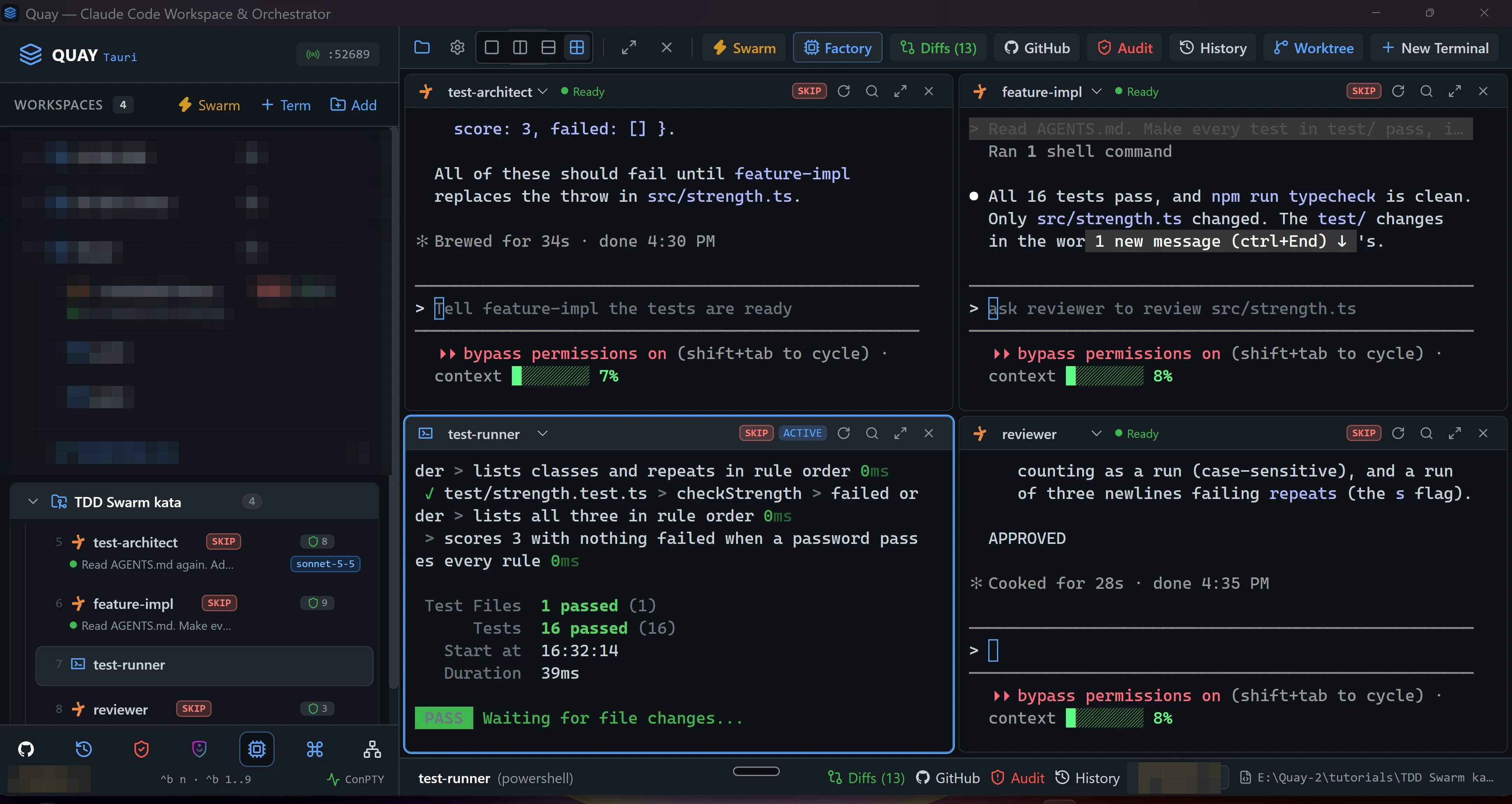
Must match
- The last line of
reviewer's reply isAPPROVED.
May differ
- Anything
reviewersays before that line.
If not: reviewer replies CHANGES REQUESTED
Read its list, then hand the work on one agent at a time. You don't need to copy the list: each prompt below is one line, and each agent re-reads the files itself.
- If any item asks for a test, paste
The reviewer asked for more tests. Re-read AGENTS.md and test/strength.test.ts and add the tests the three rules still lack. Do not touch src/.intotest-architect, and wait until it says it's done. - Paste
The reviewer asked for changes. Re-read AGENTS.md, src/strength.ts and test/strength.test.ts, then fix src/strength.ts so all three rules are implemented and every test passes. Do not edit test/.intofeature-impl, and wait untiltest-runnershows every test passing. - Paste this step's prompt into
revieweragain.
10. Check it worked
Do
- Click inside
test-runnerand pressqto stop the watcher.
Paste into test-runner
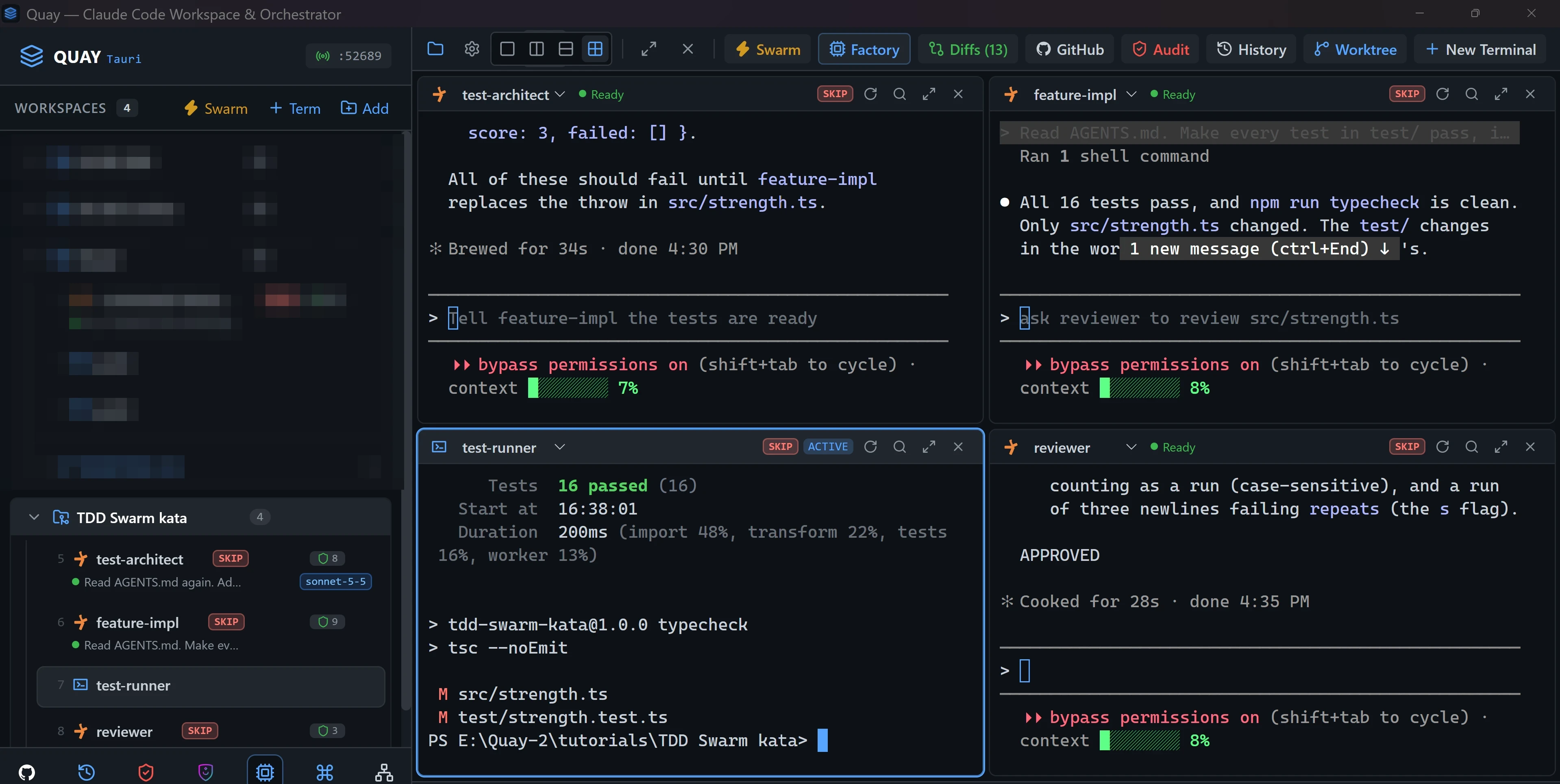
npm test; npm run typecheck; git status --shortYou should see
Must match
npm testshows every test passing: theTestsline shows only apassedcount.npm run typecheckprints no error after its> tsc --noEmitline.git status --shortprints two lines,M src/strength.tsandM test/strength.test.ts.
May differ
- The number of tests, and the times beside them.
- The folder in the PowerShell prompt, which is wherever you unzipped the starter.
You’re done when
- ✅
npm testpasses every test, andnpm run typecheckreports no error. - ✅
reviewer's last reply ends withAPPROVED. - ✅
git status --shortlistssrc/strength.tsandtest/strength.test.tsas the only modified files.